

The map is the operating surface — not a widget beside the tools that matter.
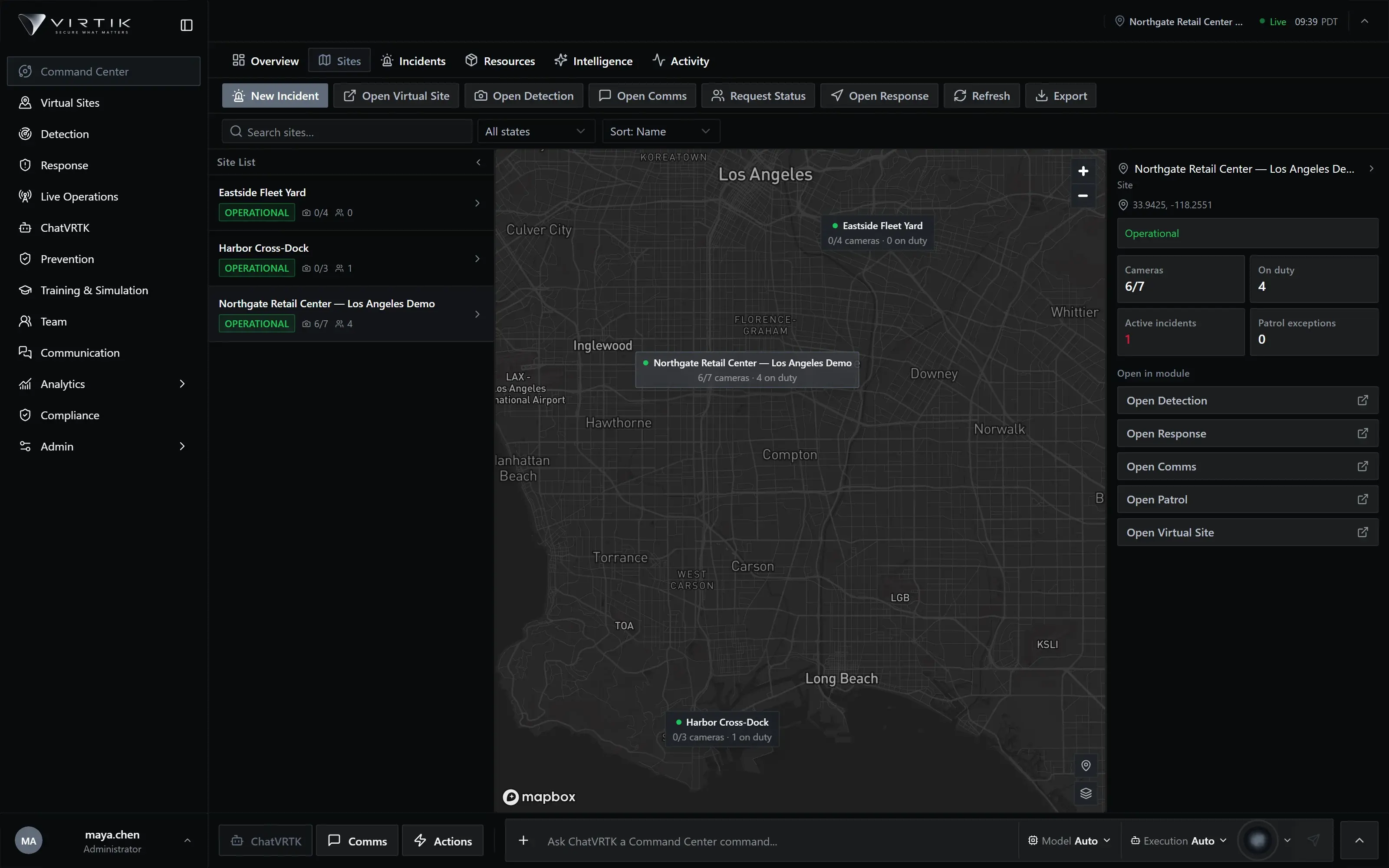
One operational map of sites, personnel and active incidents, with live presence and dispatch.
The problem
What goes wrong without it
Operators reconcile video, dispatch and site drawings by hand, under time pressure, during the incident. Each system knows part of the answer and none of them agree about where anything is.
Command Center renders sites, personnel presence and active incidents on one canonical map. Selecting a responder, opening an incident and dispatching are the same interaction in the same place, because they read from the same spatial model.
Capabilities
What Command Center does
Described from the current product build. Availability can depend on your deployment and plan.
- Live personnel presence with individual markers, clustering and zoom tiers
- Incidents resolved to a real zone in the site model, not a loose coordinate
- Dispatch and nearest-responder routing driven from the map selection
- Operational search across sites, personnel and incidents
- Personnel cards with role, assignment and direct comms handoff
- Map style, weather and layer controls scoped to the operating picture
Operational workflow
How it is used
These are ordered stages of real use, not a feature list rearranged.
- 01Observe
Sites, teams and open incidents render together on one map.
- 02Select
Click an incident or a responder to open its operational card.
- 03Assess
See what covers the location and who is nearest and available.
- 04Act
Dispatch, or open comms with the selection already applied.
Operating it
Integration, security and deployment
Integrations
- Mapping and basemap providers
- Camera and video systems for coverage context
- Identity providers for operator authentication
- Mobile devices reporting field presence
Security & permissions
Operators see the sites their role and organisation entitle them to, enforced at the database layer rather than by hiding controls. Personnel location is a privileged data class: visibility follows the same dual gate as every other operational surface.
Security modelDeployment
- Requires at least one configured operational site
- The map provider token is set when the deployment is built; there is no in-app setting
- Personnel presence requires the mobile surface or an equivalent location source
Documentation
Where the detail lives
Documentation for this module is being prepared against the product. It is not published yet.
We publish documentation only once it has been checked against the product, rather than listing procedures nobody has run. The documentation home shows what is written, in review or planned.
Documentation homeRelated
Modules that share this model
These read from the same sites, personnel and incidents.
See Command Center against your own sites
A working session using your operational context rather than a scripted tour. If your operation fits a plan available online, we will say so rather than route you through a sales process.