
What is Virtik?
Virtik is a spatial command platform for physical security operations. It models a site once, so that detection, response, communication, training and analytics can work from that model.
- Version
- 0.2
- Zuletzt aktualisiert
- Verfügbarkeit
- Teilweise verfügbar
Dokumentation durchsuchen
Auf dieser Seite
Dieses Dokument wird derzeit nur auf Englisch veröffentlicht. Englische Originalfassung lesen
Virtik is a spatial command platform for physical security operations. Video, dispatch, communications and site drawings usually live in separate products, and an operator reconciles them by hand during the incident. Virtik starts from a different place: it models the site itself, and every part of the platform is designed to work from that model.
It is built for multi-site operations, where command, detection, response and field teams need to work from one shared picture of each site.
The problem it addresses
Most security teams do not lack tools. They lack one place where those tools agree about where something is happening.
- Systems that do not share a map. Video sits in one product, dispatch in another and site drawings in a third. Operators reconcile them under time pressure.
- Alerts without place. A detection that cannot say which door, which floor or which zone forces a second investigation before anyone can respond to the first.
- Communication detached from context. Reaching the right responder means knowing who is nearest and already assigned, which usually lives outside the channel used to reach them.
The idea: the site is the data structure
Buildings become navigable models. Cameras are bound to the positions they cover. A camera that has been placed in the model is shown on Detection's Live wall with the zone, level and building it covers, rather than as a loose coordinate, and Response's Incident Scene shows the same place for an incident that has a camera-spatial link. Command Center does not show it. Virtik is designed so that every module reads from that same model, which is why it is one product and not a suite of loosely connected ones.
What the platform is made of
The platform pages describe twelve modules. The model of the site is the module called Virtual Sites; the others are designed to read from it. The application also contains two further workspaces, Prevention and Compliance, which have their own documents.
| Module | What it is for | State today |
|---|---|---|
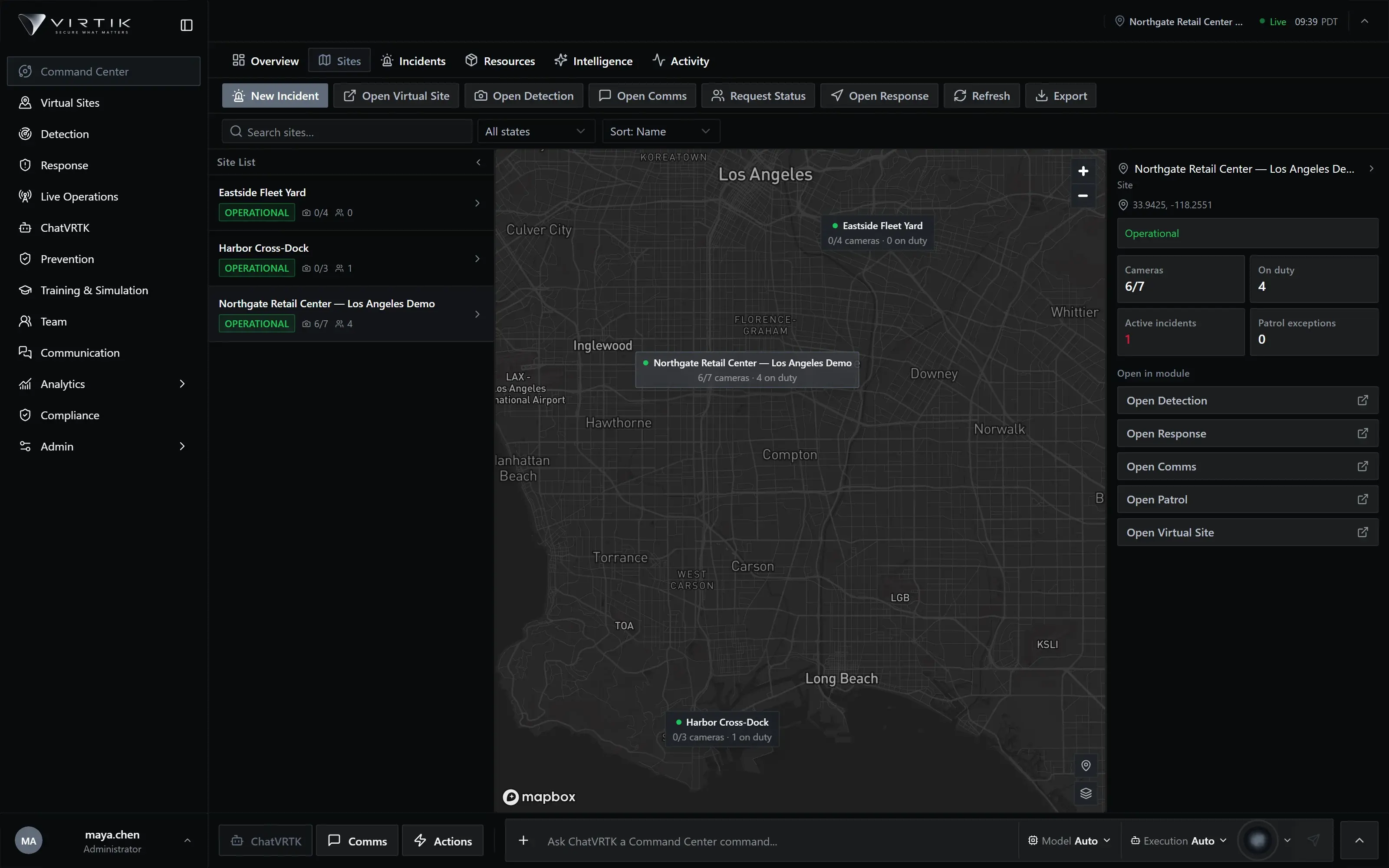
| Command Center | One operational map of sites, personnel and active incidents, with live presence and dispatch. | Teilweise verfügbar |
| Virtual Sites | Author navigable 360° site models, bind cameras to space, and keep the twin aligned to the real site. | Teilweise verfügbar |
| Detection | Camera ingestion that turns raw events into reviewable events. | Teilweise verfügbar |
| Response | Incident assessment, resource assignment and dispatch against the same spatial source of truth. | Teilweise verfügbar |
| Live Operations | The continuous operating picture between incidents: presence, coverage and real-time status. | Noch nicht verifiziert |
| Communication | Directed messaging, broadcasts and voice for teams, groups and map-selected personnel. | Noch nicht verifiziert |
| Team | The workforce behind the operation: people, teams, shifts, attendance and who is allowed to do what. | Noch nicht verifiziert |
| Mobile Operations | One adaptive field application for patrols, safety, field reports and evidence, bound to the same sites, incidents and authorization as the command center. | Teilweise verfügbar |
| Training & Simulation | Scenario-based readiness built on the same site models your teams operate in. | Noch nicht verifiziert |
| Analytics | Cross-module operational reporting over incidents, response, personnel and compliance. | In kontrollierten Tests verifiziert |
| ChatVRTK | The conversational surface for operators, grounded in your live operational context. | Noch nicht verifiziert |
| AI Intel | Governed AI execution with explicit operating modes, per-tenant policy and budget control. | Noch nicht verifiziert |
"State today" describes what has been verified, not what has been built. A module marked Noch nicht verifiziert exists in the application; its behaviour has not yet been exercised through the verification described below, so its document describes what its screens contain and makes no claim about how it performs. AI Intel is the exception: it is a name for AI policy settings and has no screen of its own, and its document says so.
What the states mean
- In kontrollierten Tests verifiziert The behaviour was exercised in a real browser on an isolated environment, with checks designed to fail if the behaviour were wrong. The claim is limited to the surfaces that were tested.
- Teilweise verfügbar Some of the described behaviour was verified and some was not. The module document says which.
- Noch nicht verifiziert The module exists, and verification has not yet been recorded.
Software capability and deployment validation
Two different questions are easy to blur, and Virtik's documents keep them apart.
- Software capability
- What the product, as built, is able to do: its screens, its rules, the data it records and the checks it enforces. The state labels above describe this, and only for what has been tested.
- Deployment validation
- Whether a particular installation works with a particular site's cameras, network, people and procedures. Nothing in this library has been validated against a customer's site, and each document says where a result depends on your environment.
A capability that was verified in controlled testing on demonstration data tells you the software can do it. It does not tell you that it will on your cameras, on your network, or under your load.
A typical flow
This is how the pieces are meant to be used together, and where a person is still the link between steps.
| Stage | Where | What happens |
|---|---|---|
| Model the site | Settings, Virtual Sites | The site is created in Settings, then its Digital Twin is built in Virtual Sites; cameras are placed in it. |
| Detect | Detection | Events arrive from cameras and are reviewed by an operator: confirmed, dismissed or escalated. |
| Open an incident | Live Operations, Response | An operator activates an incident, or escalates a detection into one. A configured rule can also open one automatically; that path has not been verified. |
| Respond | Command Center, Response | Responders are assigned and dispatched, and the incident moves through its statuses to closed. |
| Communicate | Communication, Live Operations | People are reached by message, broadcast or alert, and acknowledgements are recorded. |
| Review | Response, Analytics | An after-action review records findings, and Analytics reports on what happened. |
The stages are separate screens. Virtik carries the site and the incident across them; it does not run the sequence for you, and it does not replace a procedure.
Who uses it
Virtik's training is organised around five audiences, which match the role paths in Virtik Academy. They are audiences for training, not product roles: the product has three platform roles (administrator, editor and viewer), and an organisation defines its own operational roles.
- Operator. Works the operational picture day to day.
- Supervisor. Shift and site leads accountable for coverage and response.
- Administrator. Responsible for the tenant itself: organisation, people and permissions.
- Security manager. Security leadership accountable for the programme.
- IT administrator. IT and infrastructure teams supporting the deployment.
What a person can do is decided by their role in the organisation and, for features that depend on a plan, by what the organisation's plan includes. Access to data is enforced in the database, not only in the interface. See Security architecture.
What it looks like
Current availability
Security posture and certification status are stated on the Security page, including which certifications Virtik does not hold. Support routes are on the Support page.